
For developers & the agents they work with
Stop re-explaining
your project.
Keep decisions, tasks and agent handoffs in one place. LatticeRun gives your next coding session the project context it needs, and shows you what is left to ship.
No signup or credit card · Free projects stay in this browser
MCP connector and Project Memory: Solo Pro is $12/month.
The living tree
- 01 / KEEP CONTEXT
New session. Same explanations.
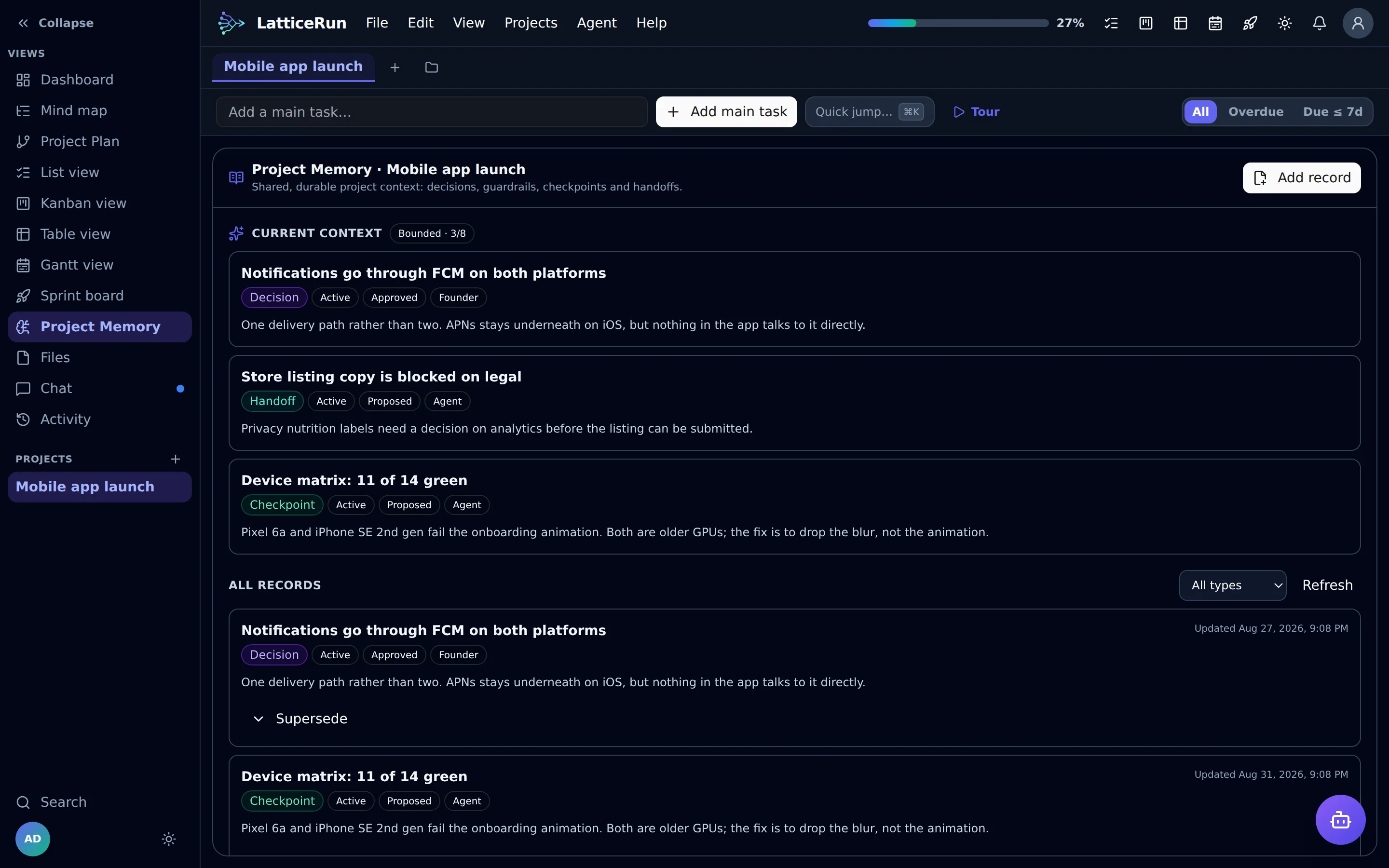
Project Memory keeps decisions, constraints and handoffs with the project. Your agent receives relevant context when it claims a task.
See how context carries over → - 02 / DIRECT AGENT WORK
The agent drifts. You chase it.
Task claims and reports show what an agent is working on. Strict mode refuses task writes outside its claimed branch.
See the agent controls → - 03 / SEE THE BUILD
A full backlog. An unclear finish.
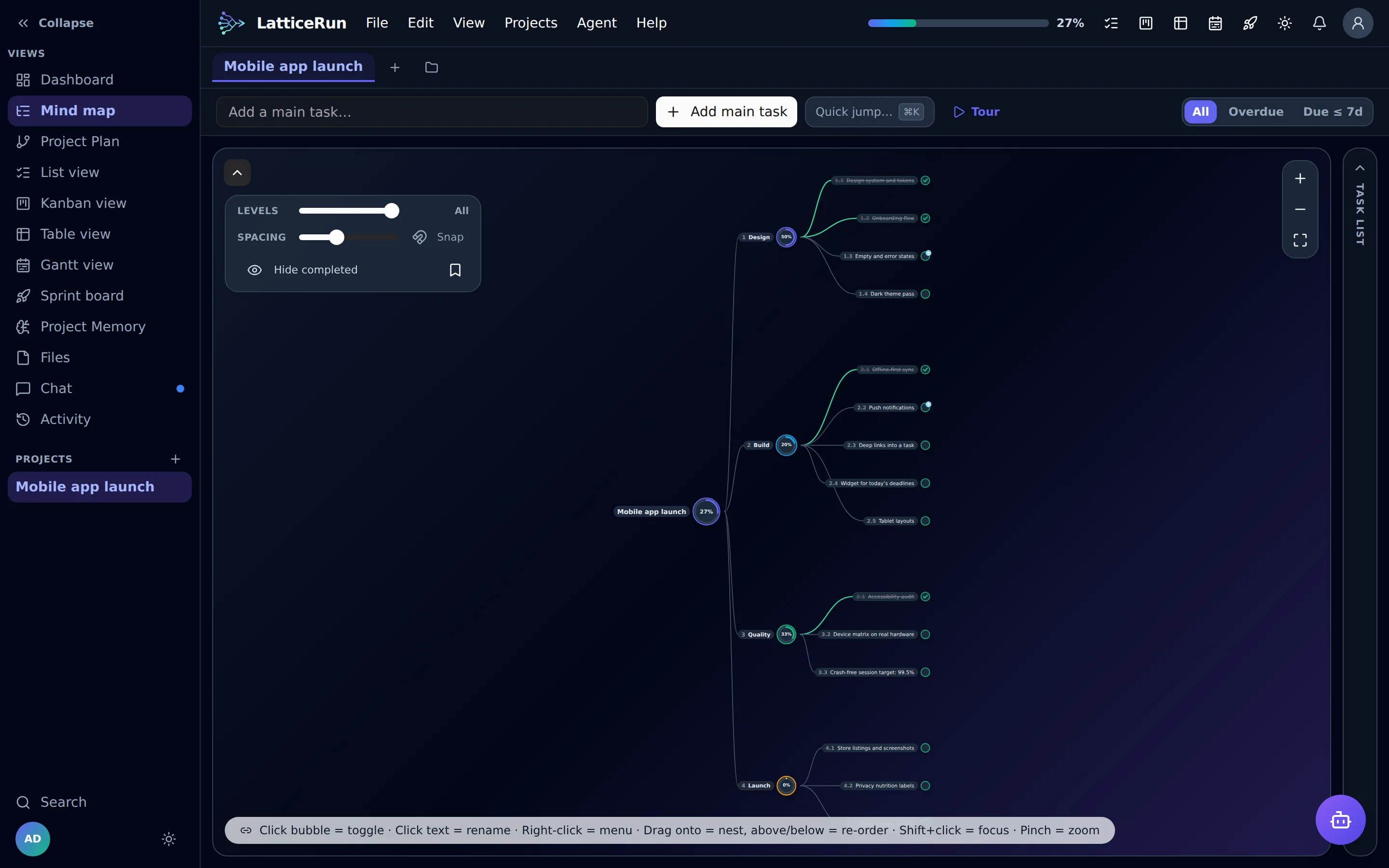
One visual task tree connects each subtask to the bigger build. Progress rolls up as you complete work, across all six views.
Explore the product →
Keep the build in view
From the first task to the next agent handoff, the work stays connected.
See what is left to ship
Break a feature into tasks and subtasks. Progress rolls up to the parent, so you can see which branch still needs work.
Explore the six views →Carry decisions into the next session
Project Memory distinguishes proposed records from approved or verified context. Your next agent can pick up relevant decisions and handoffs without treating every suggestion as fact.
Read the MCP docs →Start with your next feature
Open the free app, name a project and add its tasks. No account needed. Export JSON backups, or upgrade for cloud sync.
Start free →Current product screens
Every section of the app, captured from the current build — shown light or dark to match your system.


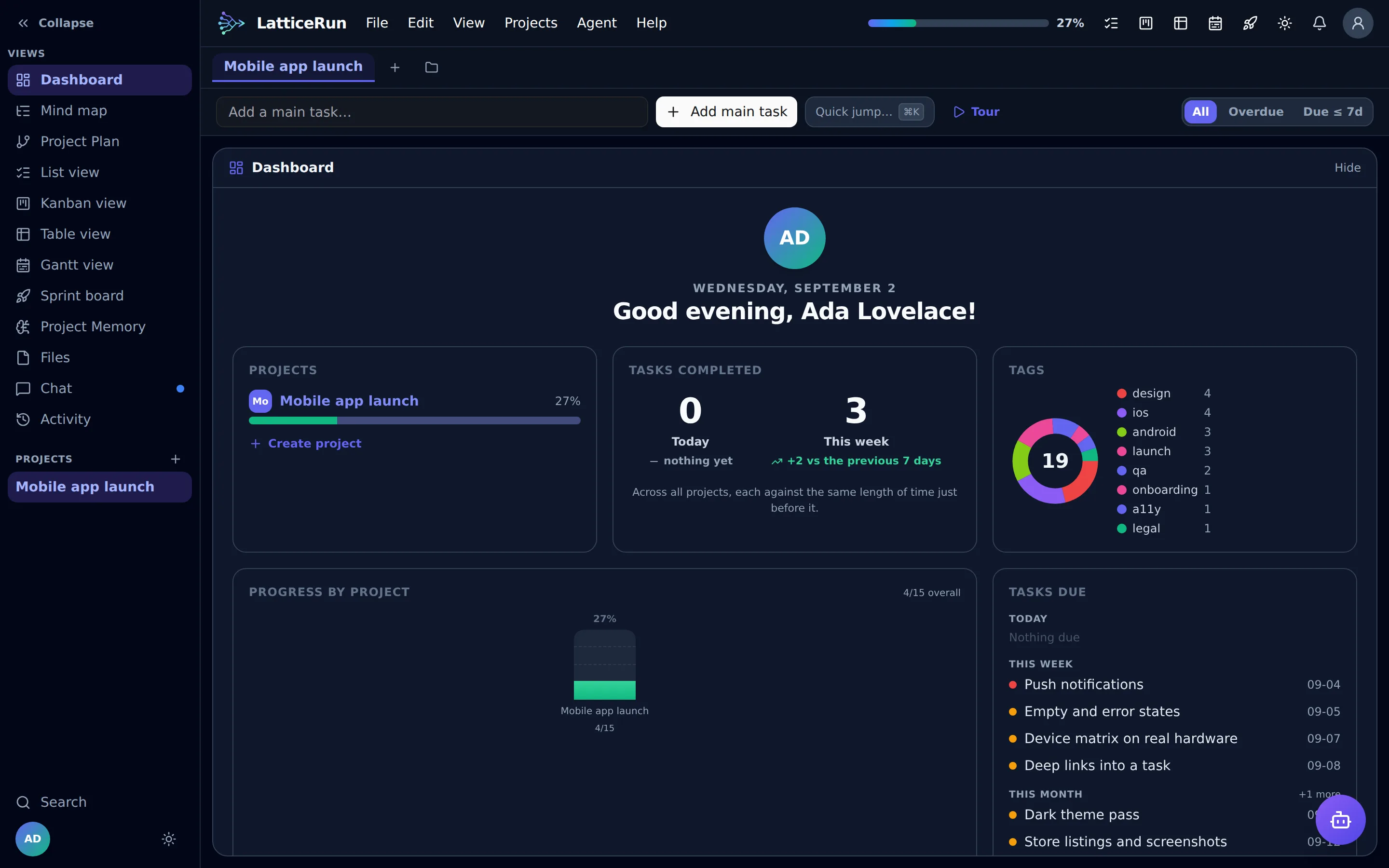
Dashboard — your day, week, tags and deadlines at a glance
Work the way your brain works today
Switch views mid-thought. Plan in the Mind map, execute from the List, review in Workstreams, audit in the Table, schedule in Gantt, focus in a Sprint.
Mind map
The living bubble tree. Drag branches, zoom, focus on one limb, watch rings fill.
List
A fast nested checklist with inline editing, drag-to-reorder and deadline sorting.
Table
A grid for audits — horizontal or vertical layout, rearrange rows and columns freely.
Workstreams
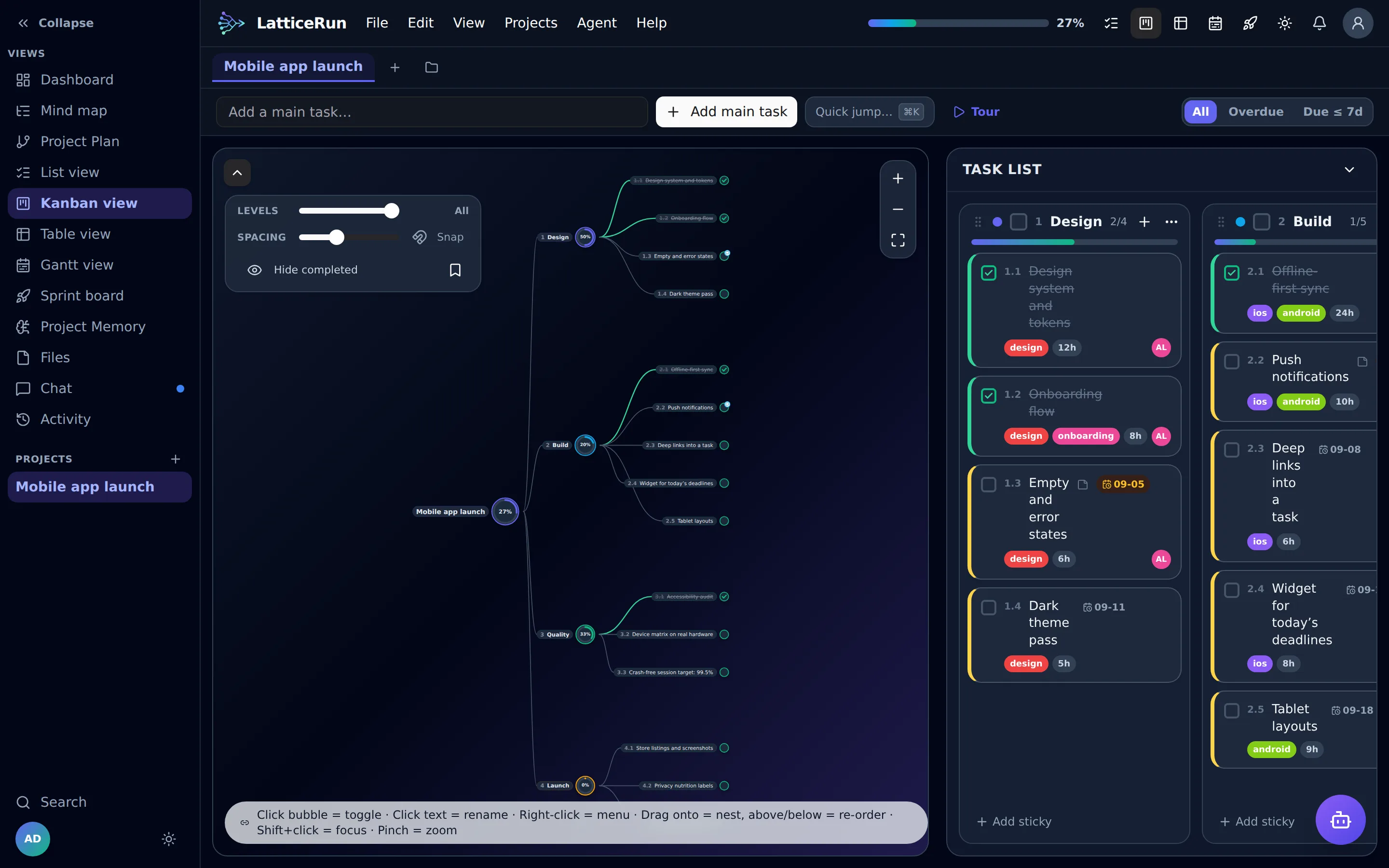
Each parent is a column, each child is a sticky. Reorder streams and cards by drag.
Gantt
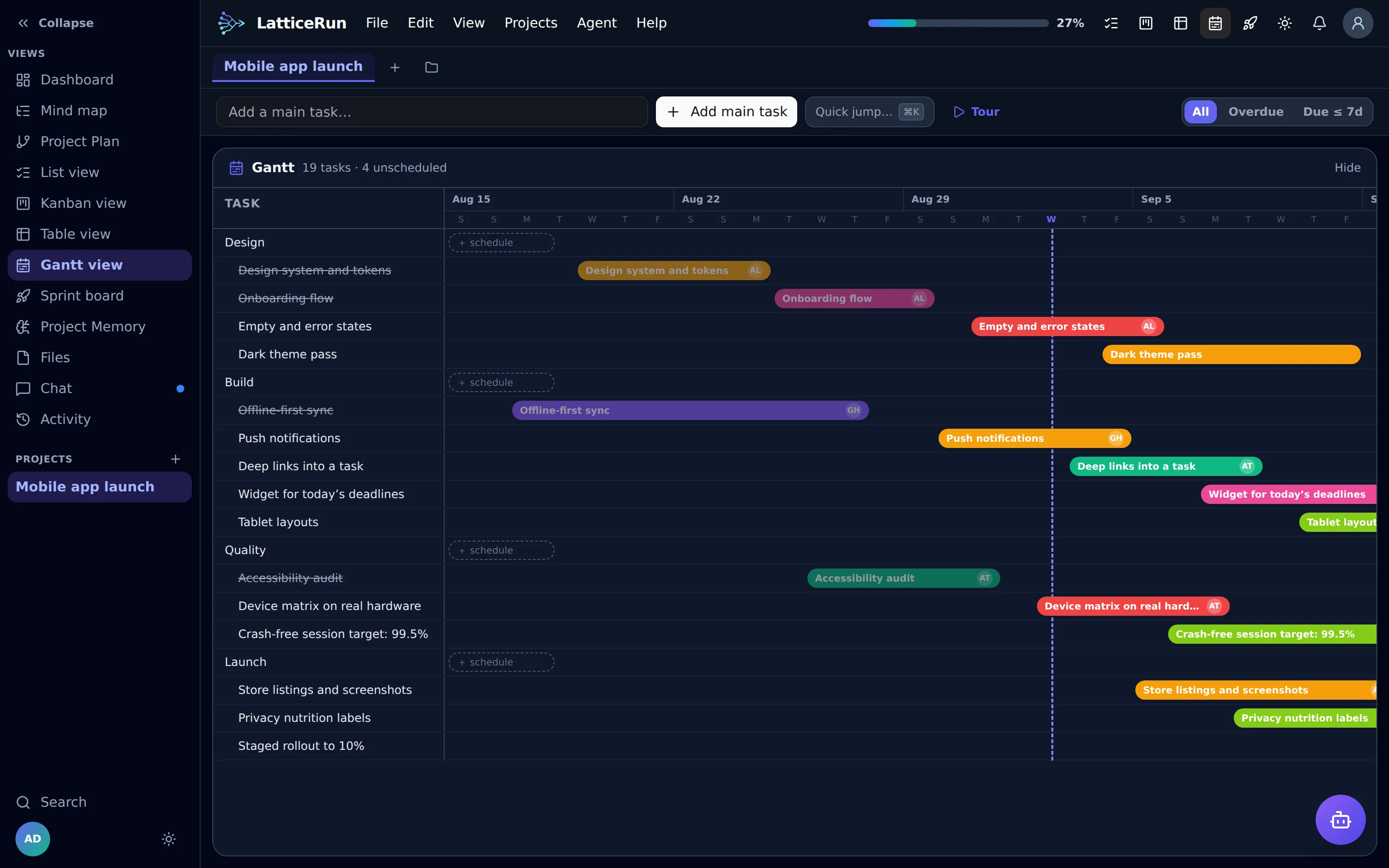
Every branch on a dated calendar with a live today-line. Day, week and month scales.
Sprint
A named sprint with a goal. Pull work in from any branch — the tasks stay where they live.
One tree, three ways of working
The same branching plan, whether it is only you, a team handing work around, or an agent doing the work while you watch.
On your own
Anything big enough to lose track of is really a tree, and writing it as a flat list is what loses it. Break it down once, work from whichever view suits the hour, and see how far in you actually are.
- A release, broken into features
- A refactor, module by module
- A side project you only touch on Sundays
With a team
Hand over a branch rather than the whole plan. Spin a task into its own linked project and a collaborator sees just that limb — while progress still flows back into the parent tree.
- A launch split across design, build and marketing
- A client workstream kept apart from everything else
- A sprint named, given a goal, pulled from any branch
With an AI agent
Your agent works the tree you already have. It claims a branch before touching it and reports what it built; if you choose to plan, the Project Plan stays where you can see it — so a run leaves an account of itself instead of a diff to reverse-engineer.
- A backlog an agent picks up between your sessions
- Bugs filed as tasks and closed with a note on the fix
- A one-line goal broken into a subtree you approve first
Ten workflows to try
- A standing workstream board your agent just works
- A bug log the agent works one at a time
- Feature intake, without a triage meeting
- Overnight runs against a schedule
- A one-line goal, broken down for you to approve
- A launch across design, build and marketing
- A client workstream kept apart from everything else
- Handing a branch over before leave
- A dissertation or a book, chapter by chapter
- A brain dump that turns into a plan
A project workflow that starts before setup
No databases to design, no onboarding weekend. Open the app and give the project a shape.
Open the app
Start in the local app without creating an account.
Name the branches
Add the workstreams that make the project real — product, design, launch, ops.
Optional: plan visually on Pro
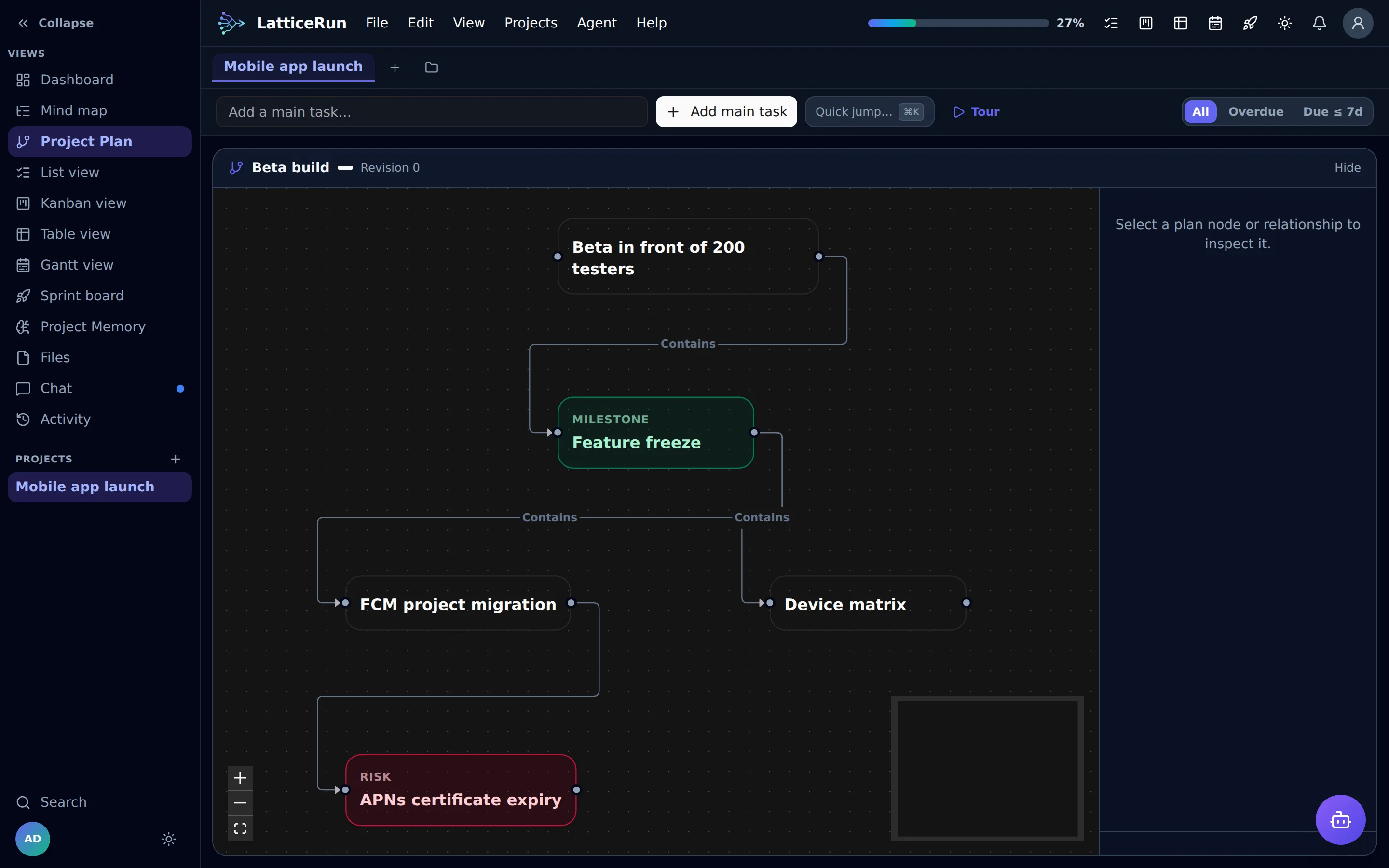
A founder, an agent, or both can draw and edit a Project Plan. Plan Mode is optional; approve and release it when ready to create or link executable tasks.
Pick the view
Plan in the Mind map. Execute from the List. Review in Workstreams. Audit in the Table. Schedule in Gantt. Focus in a Sprint.
Check the whole tree
The dashboard shows progress, tags and upcoming dates across every project.
Track the roll-up
Approved plan nodes become linked execution tasks, and task progress rolls back up through the tree as work ships.
Hand off a branch, not the whole tree
Assign any task or sub-task in isolation: LatticeRun spins it off into its own linked project, so a collaborator works on just that branch — not the parent plan — and progress flows back into the parent tree. On any mind-map task, focus mode hides every other branch while you work.
Your agent has to show its working
Connect your MCP agent on a paid plan. It claims a task, receives project context and reports what it built. Use Strict mode to refuse task writes outside its claimed branch; visual planning is optional.
Claim before you touch
An agent takes a branch and says how it means to tackle it. While it holds that claim, the branch is its to change — and nothing else is. On a strict project, work outside it is refused.
Optional visual planning
A founder, an agent, or both can draw and edit a Project Plan flowchart. Plan Mode is optional; approve and release the plan when ready, then its work becomes linked executable tasks whose progress rolls back up.
Live on the tree
A pulsing pill shows which branch an agent is holding right now and its own sentence about what it is doing. Anything it gave up on is flagged blocked, with the reason.
Project Memory for successors
Shared, durable project context keeps decisions, guardrails, architecture, checkpoints and handoffs with the project, with trust labels so the next agent knows what is proposed, approved or verified.
Start free. Add agents when you need them.
Free includes local projects and all six views. Paid plans add cloud sync, the Project Plan, Project Memory and MCP agents.
Free
Forever · account optional
- Unlimited projects, saved in this browser
- All six views + dashboard
- Themes & dark mode
- Undo/redo, focus mode
- JSON & SVG export — your backup
No copy is kept on our servers, so clearing your browser data — or switching browser or device — loses it. Export regularly, or upgrade for cloud backup.
Open the appPrefer an account? Create one free — it keeps your profile and plan with you. The MCP connector and Project Memory arrive when you upgrade.
Solo Pro
or $99/year (save 2 months)
- MCP connector — your agents claim and report work
- Project Memory — stop re-explaining the project
- Project Plan
- Everything in Free
- Cloud sync across devices
- File attachments & notes on any task
- Reminders, notifications & version history
Founder Lifetime
One-time · first 200 founders only
- Everything in Solo Pro
- Forever — no subscription
- Founder badge on your profile
- Vote on the roadmap
- Our eternal gratitude 🌱
Team Block
Up to 5 seats ($9.80 each) · $119/mo up to 15 ($7.93 each)
- Team MCP tokens — two per seat
- Everything in Solo Pro, for every seat
- Collaboration & project chat
- Share a project — or spin off a branch and share just that
- Task assignment & ownership
All paid plans come with a 30-day no-questions refund. Cancel anytime in account settings.
Honest answers
Is my data private if there's no account?
Completely. On the Free plan your projects are written to this browser's local storage and never sent to us — we have no copy and no way to read them. You can export any project as JSON (a full backup) or the chart as SVG at any time. Cloud sync is opt-in and only on paid plans.
Can I lose my Free-plan projects?
Yes, and it's worth being blunt about it. Free projects live in one browser's local storage, so they go away if you clear cookies and site data, use "private"/incognito windows, uninstall the browser, or let the browser evict storage when disk space runs low. They also don't follow you to another browser, device or profile. Because we never receive a copy, we cannot restore them for you. Two ways to be safe: export to JSON periodically, or move to a paid plan and let cloud sync keep a server-side copy.
How is this different from Notion, ClickUp or Taskade?
Those are workspaces; LatticeRun is one thing done exceptionally: a task tree with live progress bubbles, seen through six views, that stays out of your way. No databases to design, no setup weekend. Open it, grow your tree, ship.
What is a "linked project"?
Any task can be spun off into its own standalone project that stays in two-way sync with the parent tree. On Team plans you can invite a collaborator to just that spin-off — they never see the rest of your tree.
Can my AI agent use LatticeRun?
Yes — Pro and Team plans include a first-party MCP connector. Point Claude Code, Kimi, Hermes or any MCP-compatible agent at it and it can work your trees directly. Start with Keeping an agent on the plan; the tool-by-tool reference is in the connector docs.
How does the Project Plan work?
A founder, an agent, or both can draw and edit a flowchart. Using an agent's Plan Mode is optional. When you approve and release the plan, its executable nodes create or link tasks, and progress rolls back up as those tasks move.
How do you stop an agent going off-plan?
By checking the claim workflow on task-changing calls. Claiming gives the agent its branch, the project brief, bounded Project Memory and a Project Plan synopsis; a successful completion checkout records what was built and saves a proposed checkpoint. Guided corrects out-of-sequence work without refusing it. Strict refuses writes outside the claimed branch and blocks new claims when the standing brief is overdue. Agents can read the setting, but no tool can lower it.
What is Project Memory?
Project Memory is shared, durable project context: decisions, guardrails, architecture, checkpoints and handoffs stored with the project for successors. Trust labels show whether a record is proposed, approved or verified.
Do I still need Obsidian or a memory tool alongside it?
Often, no. Project Memory is the shared, durable record of decisions, guardrails, architecture, checkpoints and handoffs. agent.md remains the compact standing brief, task notes stay attached to work, and Activity records what happened. Agents receive a bounded, trust-labelled briefing when they claim work, so successors can continue without treating every proposal as fact.
Who is LatticeRun for?
Solo founders, indie hackers, freelancers and small teams who think in trees but ship from lists. If you've ever drawn a project as branches on paper, this is for you.
Put your next feature on the plan.
Open the free app. Create a project. Break the work into tasks.
Start building for free →